
Debugging is the process of identifying, analyzing, and fixing issues or errors in code to ensure it functions as intended. It is an indispensable skill for any developer, and when working with React applications, it becomes even more crucial. Knowing how to effectively debug a React app can significantly enhance development efficiency and reduce downtime. React's dynamic nature and component-based structure can make identifying and resolving issues challenging. In this guide, we’ll cover effective debugging strategies and tools to streamline your workflow and make troubleshooting easier.
Best Ways to Debug a React App
1. Leverage Browser DevTools
Browser Developer Tools (DevTools) are a go-to resource for debugging React apps. They allow you to inspect the DOM, monitor network requests, and debug JavaScript code in real time.
- Console:Use console.log() to output variable values, component states, or props.
- Sources Tab:Set breakpoints to pause and inspect your code during execution.
- Network Tab:Check for API response issues or failed network requests.
2. React Developer Tools
React Developer Tools (React DevTools) is a browser extension designed specifically for React applications. It provides a detailed view of your React component hierarchy and state.
- Component Tree:Inspect components, view their props, and check state values.
- Highlight Updates:Identify components re-rendering unnecessarily.
- Profiler:Measure performance and pinpoint bottlenecks.
Install React DevTools for Chrome or Firefox.
3. Use Error Boundaries
Error boundaries catch JavaScript errors in child components and display a fallback UI instead of crashing the application.
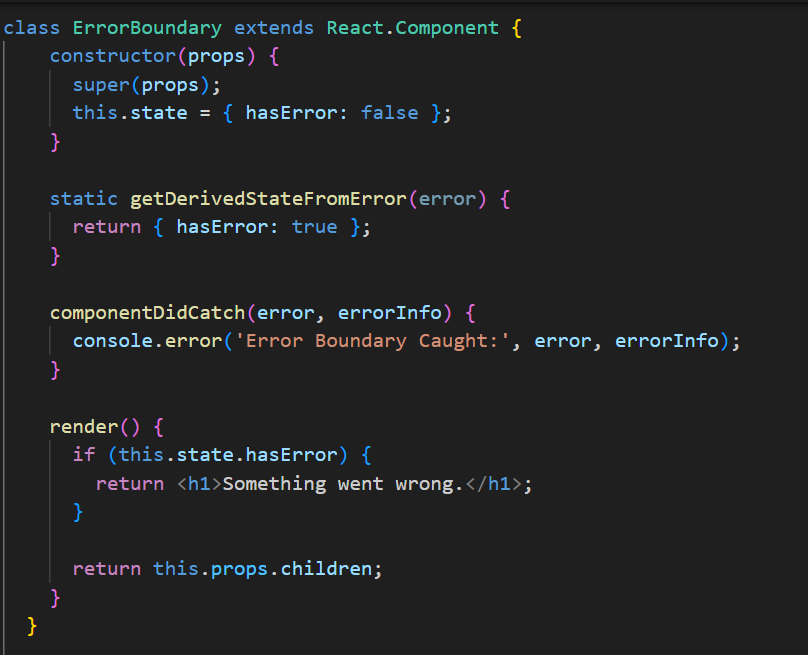
Wrap your components with <ErrorBoundary>to handle runtime errors gracefully.</ErrorBoundary>
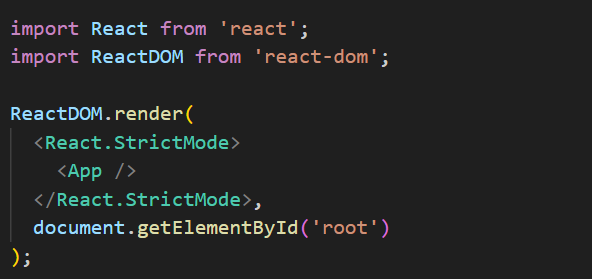
4. Enable React.StrictMode
React.StrictMode is a development-only feature that helps identify potential problems in your code. It highlights issues like deprecated lifecycle methods or unsafe side effects.
5. Debugging State and Props
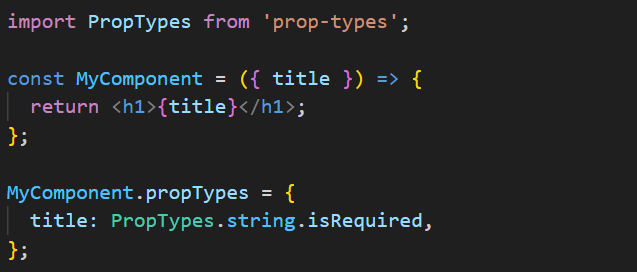
State and props are at the core of React, so debugging them effectively is critical.
- Track State Changes:Use console.log() to log state before and after updates.
- Prop Validation:Add PropTypes to validate the types of props passed to components.
6. Debugging Network Requests
For applications interacting with APIs, use tools like:
- Axios Interceptors:Log request and response data.
- Fetch Debugging:Add .catch() blocks to handle errors.

7. Use Debugging Libraries
Libraries like why-did-you-render can help you identify unnecessary re-renders in your components.
Conclusion
Debugging in React doesn’t have to be daunting. By using the right tools and techniques, you can quickly identify and fix issues in your application. At Memetic Solutions, we don’t just help you debug—we assist in crafting high-quality, scalable React applications from the ground up. Our team of experts specializes in creating robust architectures, implementing best practices, and ensuring seamless performance in every project.
Whether you need assistance with debugging, building new features, or launching an entire application, Memetic Solutions is here to help. Let us empower your team to develop React applications that are efficient, reliable, and tailored to your specific needs.
Reach out to Memetic Solutions today to learn how we can partner with you to create exceptional applications.